
LaserAway
LaserAway Medical Group, INC.Beauty
4.659.00 Reviews
- Version
- 2.0.81
- Installs
- 10.00K
- Age Rating
- Everyone
Screenshots
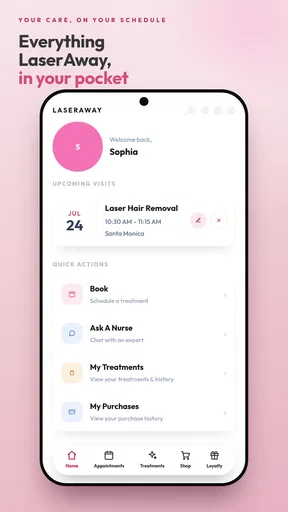
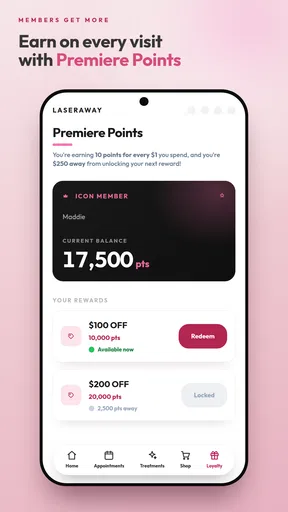
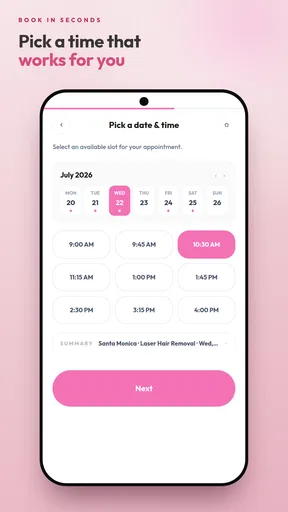
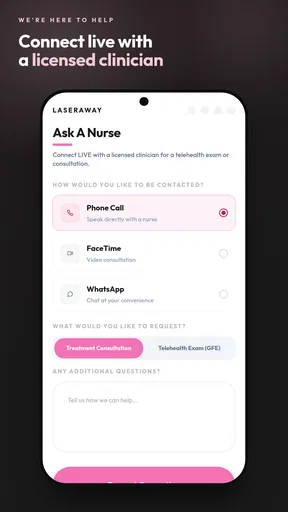
Our Review of LaserAway
 Analysis by Appyee
I went into LaserAway expecting a straightforward beauty-service companion, and that is exactly where it makes the most sense. It is a free beauty app from LaserAway Medical Group, INC., built for people who already use LaserAway or are considering its services and want a more convenient way to stay connected. My overall impression is positive: the app feels more useful as a practical access point than as a complete beauty-management platform.
The important distinction is that this is not a general skincare encyclopedia or a replacement for professional advice. Its value depends heavily on whether LaserAway is part of your routine. If it is, having the company’s mobile experience in one place can reduce the need to search through messages, browser tabs, or saved contact details. If you are looking for broad product comparisons, independent treatment research, or a beauty planner that covers many providers, this is probably not the right first choice.
How the app fits into a real beauty routine
In everyday use, I would treat this as a service-access app rather than something I would open repeatedly for entertainment or casual browsing. A realistic situation is preparing for an appointment during a busy day: I might check the app before leaving work, confirm the information I need, and use it as my central reference instead of switching between several channels. That kind of small convenience matters more than flashy extras in a beauty-service app.
The app’s store summary, “Ignite The Potential Within,” gives it an aspirational tone, but my practical recommendation is based on the less glamorous details: whether it helps you handle your relationship with the provider without unnecessary friction. In that role, the experience is easier to appreciate. It is not trying to be every beauty tool at once, and that narrower purpose can be a strength.
LaserAway is listed as a free app for Everyone, so the basic decision to try it is relatively simple. I would still separate the app from the treatments themselves. Installing the app does not turn a cosmetic decision into a medical one, and anyone considering a procedure should continue to rely on qualified staff for suitability, preparation, and aftercare questions. The app can support that process, but it should not be treated as the authority for personal health decisions.
What feels quick and what may take patience
My expectation for speed here would be modest and realistic. A service app usually feels fast when it gets me to the one task I came to complete, not when it contains a large number of screens or visual effects. LaserAway benefits from having a focused purpose, so I would expect ordinary navigation to feel more manageable than a broad beauty marketplace filled with unrelated brands and content.
At the same time, the app’s usefulness can depend on information connected to an account, an appointment, or the provider’s systems. That means a screen may feel less immediate than a purely offline beauty journal. If something needs to be retrieved or updated remotely, the experience can naturally depend on connectivity and the service behind the app. I would not judge the app solely by how quickly its opening screen appears; the more meaningful test is whether it gets me to the right account or service information without making me repeat steps.
One tip I found useful is to open the app before I am standing at a clinic or rushing between errands. That gives me time to sign in, check that the relevant information is available, and deal with any account friction while I still have a moment. It is a small habit, but it prevents the app from becoming an extra source of stress at the exact time I need it.
What happens during heavier use
Heavy use for this app is different from heavy use for a game or a video editor. I would not expect long continuous sessions. The demanding moments are more likely to happen when I am moving through several service-related screens, checking details before an appointment, or returning to the app after a period away and needing to reorient myself.
That makes the app’s design discipline important. A focused service tool should avoid making me dig through decorative content before I can reach the practical part. When I use an app like this, I want the most relevant action to remain obvious even if I have not opened it for weeks. Beauty appointments are often occasional rather than daily, so the interface has to support memory: clear labels, predictable navigation, and enough context to remind me what each section is for.
There is also a trade-off between convenience and concentration. Keeping provider-related information together is helpful, but I would not want to rely on the app as my only personal record. For an important appointment, I would still keep the date and time in my normal calendar and follow any instructions given directly by the clinic. That two-part workflow is safer and more practical than assuming one app should manage every reminder and decision.
Another non-obvious use case is comparing your own routine over time. Even without turning the app into a full beauty diary, I can use it as a prompt to think about why I booked a service, what I wanted to ask, and what follow-up information I need. Writing those notes elsewhere before an appointment can make the visit more productive. The app works best as the access point, while my personal notes remain the place for observations and questions.
Reliability and the confidence to depend on it
The app has an average rating of 4.7 from over 260 ratings, with more than 50 written reviews, which suggests that many users find the experience worthwhile. I see that as encouraging rather than conclusive. Ratings tell me that the app is meeting expectations for a substantial group, but they do not remove the need to test whether it fits my own device, account, and habits.
The current release is version 2.0.81, and the app was released on November 17, 2022. Those details make it feel like an established product rather than a brand-new experiment. Still, reliability is not only about how long an app has existed. For me, the real question is whether it remains understandable when I return after a gap, whether information appears consistently, and whether the app gives me a clear next step when something requires attention.
I would also keep a backup route for time-sensitive matters. If an appointment is imminent or a treatment question is important, I would contact the clinic directly rather than assuming the app is the only channel I need. That is not a criticism unique to LaserAway; it is sensible behavior for any provider-linked app. A mobile interface is convenient, but direct professional communication remains more appropriate for urgent or individualized concerns.
One strength of a provider-specific app is continuity. Unlike a generic beauty app, it is connected to one service relationship instead of asking me to recreate that context manually. The weakness is the same: if I stop using that provider, much of the app’s value decreases. This is a more specialized tool than a general appointment calendar, so its reliability matters most to an existing customer rather than to a casual beauty browser.
Device limits and the right expectations
LaserAway supports devices running Android 7.0 or later. That gives it a broad compatibility range, including older Android hardware, but compatibility alone does not guarantee the same experience on every phone. Older devices may have less comfortable screen layouts, slower transitions, or more pressure from other apps running at the same time. I would be especially careful about keeping enough free storage and updating the operating system when the phone supports it.
The app has over 10 thousand installs, so it is not an obscure download with no visible user base. Even so, the scale is much smaller than that of a universal calendar, shopping app, or social platform. I would interpret that as a sign of specialization, not as a reason to expect the same level of device optimization found in the biggest mobile products.
On an older phone, my practical approach would be simple: close demanding apps before opening LaserAway, use a stable connection when accessing account-related information, and avoid waiting until the last minute to check anything important. Those habits do not change the app’s features, but they can make a noticeable difference in perceived responsiveness and reduce confusion about whether a delay comes from the phone, the connection, or the service itself.
For iPhone users, the sensible step is to check the current availability and compatibility in the relevant store before planning around it. I would not assume that an Android requirement automatically describes the iOS experience. The important point is to verify the version appropriate to your own device and to keep a second way of reaching the provider for anything time-sensitive.
Where it beats ordinary alternatives
The usual alternative is often a mixture of browser bookmarks, calendar entries, email, text messages, and a phone contact. That setup can work, but it scatters the relationship across several places. A dedicated provider app has the advantage of giving me one recognizable starting point when I want to deal with LaserAway specifically.
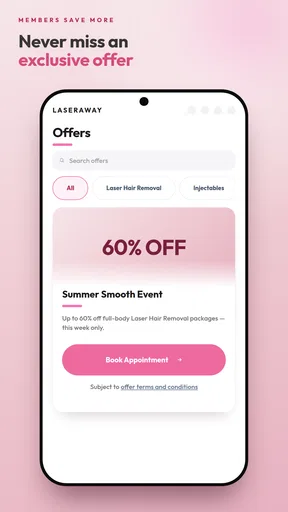
Compared with a general beauty app, LaserAway is more focused and less useful for discovery outside its own ecosystem. A skincare tracker might be better for recording products and reactions. A calendar might be better for reminders across every part of my life. A clinic’s direct contact method might be better when I need an answer from a person. The app’s advantage appears when I want provider-related convenience without building the workflow myself from unrelated tools.
That comparison also explains who should skip it. If I have never used LaserAway and only want neutral education about cosmetic treatments, I would start with professional consultation and independent research instead. If I already have a system that reliably handles appointments and communication, installing another app may not improve anything. The free price removes a financial barrier, but it does not remove the cost of attention: every app I add becomes another place to check.
Small workflow improvements that make it more useful
I would begin by setting up the app when I am calm, not during an appointment rush. After installation, I would make sure I can recognize the correct account area, review the information relevant to my next visit, and decide which details belong in my calendar. This avoids treating the app as a last-second rescue tool.
Before visiting a clinic, I would prepare a short list of questions separately. For example, I might note concerns about timing, skin changes, or what I should do after a service. That list gives the appointment a purpose and prevents me from confusing convenient app access with personalized medical guidance. The app can help me arrive organized, but it cannot replace the conversation.
For people who use more than one device, consistency is another practical consideration. I would choose one primary phone for appointment-related checks and avoid assuming that every device will display information identically. If I change phones, I would test access well before the next scheduled visit rather than discovering a login or compatibility issue at the clinic.
A final tip is to judge the app by repeat visits, not by the first launch alone. The first session may involve setup and exploration, while the real benefit appears later, when I need a familiar route to provider information. If returning to it saves steps, it has earned a place on my phone. If I keep opening it and then switching to other channels, the browser or direct contact method may be the better solution for me.
My performance verdict
After looking at the app through speed, heavier-use moments, reliability, and device constraints, I see LaserAway as a focused utility with a clear audience. Its performance should be judged by low friction and dependable access rather than by the depth or excitement expected from a content-heavy app. The strongest experience is likely to come from users who already have an active relationship with LaserAway and want a dedicated mobile route to that service.
I like the fact that it is free, broadly accessible on older Android versions, and supported by a strong average rating from its user base. I also appreciate the narrower purpose: it does not need to pretend to be an all-purpose beauty platform to be useful. The main limitation is equally clear. Its value is tied to one provider, so people looking for independent beauty planning, broad treatment education, or a universal appointment organizer may get more from another tool.
My recommendation is to install it if LaserAway is already part of your beauty routine, especially if you prefer having provider-related tasks gathered in one place. Use it alongside your calendar and direct clinic communication, not instead of them. For everyone else, I would only choose it after deciding that LaserAway’s own service ecosystem is what I actually need.
LaserAway Medical Group, INC. has created an app that is most convincing when used as a practical companion rather than a destination. It will not replace professional consultation or a complete personal-care system, but it can make the provider relationship easier to manage. If your goal is simpler access to LaserAway, this app is worth trying; if your goal is broader beauty guidance, look beyond it.
Privacy and Permissions
See what permissions an app requests and how it handles your data.
- Calendar
- read calendar events plus confidential information, add or modify calendar events and send email to guests without owners' knowledge
- Location
- approximate location (network-based), precise location (GPS and network-based)
- Photos/Media/Files
- read the contents of your USB storage, modify or delete the contents of your USB storage
- Storage
- read the contents of your USB storage, modify or delete the contents of your USB storage
- Camera
- take pictures and videos
- Other
- view network connections, full network access, run at startup, draw over other apps, control vibration, prevent device from sleeping, read Google service configuration
Verdict
Strengths of LaserAway
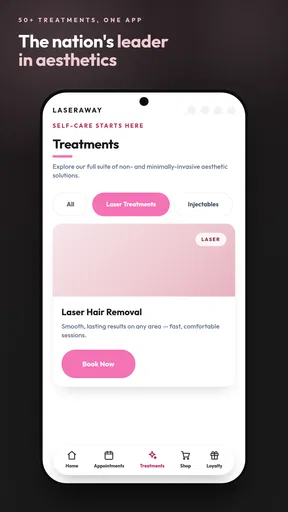
- Easy access to consultations and treatment information in one app.
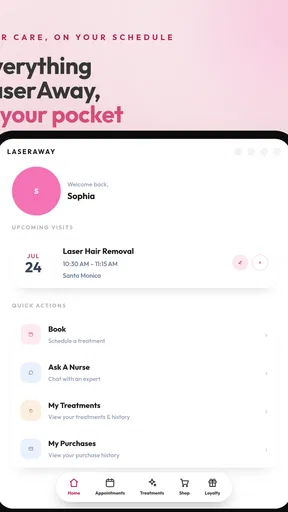
- Useful for managing appointments and keeping track of scheduled visits.
- Helps users find nearby LaserAway clinics quickly.
- Treatment details can make it easier to prepare before an appointment.
- Convenient mobile access to LaserAway services while traveling.
Limitations of LaserAway
- Some features may depend on clinic availability and location.
- The app cannot replace an in-person consultation with a specialist.
- Treatment pricing may vary and may not be fully clear upfront.
- Users may still need to contact the clinic for certain requests.
- Not all services or promotions may appear equally across locations.
Similar Picks in This Category
View All
Beauty Makeup Editor & Camera
Photo & Video Editors - Instant Solution4.7

Perfect365: Face Makeup Editor
Perfect365, Inc.3.5

Mirror Plus - HD Mirror app
Digitalchemy, LLC4.8

Cute Lock Screen & Wallpapers
Prometheus Interactive LLC4.6

HD Camera for Android
One Music Player4.5

Phone Mirror app - True Mirror
Cards4.6
Frequently Asked Questions
What is LaserAway, and what services does it offer?
LaserAway is a beauty and aesthetic treatment provider offering services such as laser hair removal, tattoo removal, skin rejuvenation, acne treatments, body contouring, injectables, and other cosmetic procedures. Depending on your location, the available treatments, pricing, and promotions may differ. The app or website is mainly useful for exploring services, finding nearby clinics, booking consultations, and managing appointments.
Can I book a LaserAway appointment through the app?
In supported locations, the LaserAway app or online platform can help you request or manage appointments, view clinic information, and contact a treatment center. Appointment availability depends on the selected clinic, treatment type, and staff schedule. Before booking, review the appointment details carefully and confirm whether a consultation is required, especially for injectable treatments, laser procedures, or services involving medical eligibility.
Are LaserAway treatments safe for everyone?
LaserAway treatments are not automatically suitable for every person. Eligibility can depend on factors such as skin tone, hair color, medical history, medications, pregnancy, recent sun exposure, tattoos, allergies, and previous cosmetic procedures. A qualified professional should evaluate you before treatment and explain possible side effects, limitations, and aftercare. Never rely only on information in the app when making a medical decision.
How much do LaserAway treatments cost, and does the app show exact prices?
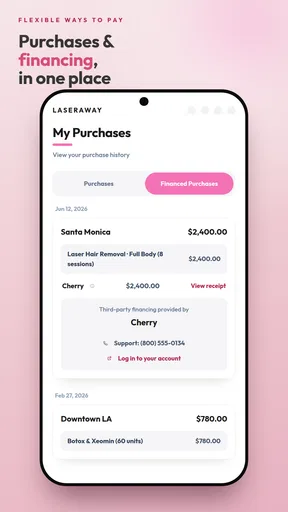
Treatment prices can vary considerably based on the service, number of sessions, clinic location, treatment area, promotions, and any membership or financing option. The app may display starting prices, offers, or consultation information, but these figures may not represent the final cost. Ask the clinic for a complete written estimate, including packages, maintenance sessions, cancellation terms, financing conditions, and any additional fees.
What should I know before downloading or using the LaserAway app?
Before downloading the LaserAway app, check whether it is officially available in your country and whether your local clinic supports its booking and account features. You may need to provide personal information, contact details, appointment data, and possibly health-related information. Review the privacy policy, notification permissions, and cancellation rules. The app is a convenience tool and does not replace an in-person consultation with a licensed professional.
